


You can rewrite your company’s homepage, update the sales scripts, organize a huge re-launch, and still find ChatGPT describing your product in outdated buzzwords from last year.
The problem is multifaceted but the root is often in your own library. You can’t fix any of it until you know what the internet is saying about you. That’s where audits come in.
In this post I’ll explain how we run audits that document and analyze a company’s brand mentions across the internet.
TL;DR
- Audit Google and AI search engines to document your brand mentions
- Audit your own content library to identify outdated messaging
- Locate high-traffic pages on your site to weed out the old messaging
- Update and delete outdated content accordingly
Overview: outdated content will warp your brand presence
Let’s say that your product started off as a toothpaste but, six months into sales, you realized that it sold better as a floor polish. You updated the homepage, the sales materials, and the call scripts. You’ve been hammering the message on social media. And yet, one year later, people still think you’re in the toothpaste business.
More specifically: search engines keep serving up that outdated impression of your brand. Google search does it by highlighting pages with your old product messaging. (Some of it is from your own site, some of it from others.) ChatGPT describes your brand as a “controversial dental hygiene product.”
As a marketer, it’s incredibly frustrating to see that your new message hasn’t broken through. You won’t be able to fix this issue until you get to the root of the problem. That’s where an audit comes in.
“What does the internet think of your brand?”
That’s the question I’m trying to help you answer with this post. Of course, “the internet” in this context is a big, messy compilation of websites, search engine results, social media posts, product reviews, thought leadership pieces… A rabbit hole that feels infinitely deep.
Alas, you can’t control it all.
Here’s what you can exercise some control over: how search tools (like Google search, ChatGPT, and Gemini) present your brand to buyers who are doing product research. In this vein we have two primary goals:
- When a buyer asks about your brand in a search engine (e.g. “What does Brand XYZ sell?”) the response they get reflects your present-day product and brand messaging.
- When a buyer asks about products in a certain category (e.g., “What are some good database management platforms?”) your brand is mentioned alongside your competitors in the search engine response.
You have to know what they’re saying before you improve it
To understand how websites and search engines are describing your product to buyers, you have to run a comprehensive audit of those channels.Later in this post we’ll get into the nitty-gritty of these audits:
- Audit external websites. Find the top-ranked pages that mention your brand via Google SERPs. Grab the text from those pages. Analyze it to see how current their descriptions are.
- Audit AI search results. Apply the same query-and-document process to the narrative descriptions provided by LLMs like ChatGPT and Gemini.
- Audit your own website. Run that same AI workflow on your own site in order to identify outdated, overlooked pieces that are muddling your brand identity.
- Review the high-impact pages on your site in particular. The most important edits you make will be on the pages that see a lot of engagement. Those are the pages most likely influencing your presence in search.
I’ve seen companies turn their brand presence around pretty quickly by focusing on their audit and update resources on their own website content. It’s often the highest-impact platform over which you can exercise some control. You can (and should) update your brand profile on product review sites like G2, for example, but you can’t control what people write about you there.
Success story: Common Room revises its presence in LLMs
Common Room thought they had their new brand messaging dialed-in. Then they ran an audit.

Common Room had changed their positioning from a “community platform" to an “AI platform for pipegen.” They updated the messaging in all the usual places, cranking out new content, all of that. A full year later, it seemed like nobody was getting the message.
I remember talking out the issue with Kevin White, who was running Common Room’s marketing at the time. Kevin wrote about the project on LinkedIn and his post really stuck with me because it distills the value of brand management in search.
Around that time Kevin audited the company’s presence in AI search. He found that the big LLMs were serving up outdated characterizations of Common Room. He needed to figure out why that old positioning was showing up.
He audited Common Room’s content library and found a slough of old pages, deep in their blog site, which had the outdated “community platform” messaging. He took some of the pages down, updated others, and made strategic updates across the website so that LLMs would get the proper message.
On top of that, he had his team update messaging on external sites where they could, like G2 and LinkedIn profiles. Within a few weeks, LLMs started serving up the modern interpretation of Common Room.
According to Kevin, the positive change was driven by his updating high-impact pages. He saw those pages cited more in LLM responses.
Auditing external sites via Google Search
Google remains the primary entrypoint for product research so it’s worth starting your audit here. We use an AI workflow to run Google searches and document the results. The searches fit into three broad categories:
- The outdated product categories (e.g. “best community platform”)
- The new, desirable product categories (e.g. “best AI pipegen platform”)
- The brand itself (e.g. “What is Common Room?”)
The automated workflow runs through this basic process:
- Run searches related to those 3 topics
- Review the top pages in the SERPs
- Document any mentions of our brand from those pages
- Collect all mentions in one document
- Analyze the content for specific questions
The analysis focuses on the brand’s specific product marketing concerns of the moment.

We can analyze for any concern (as I’ll get into below) but it basically comes down to core concerns:
- What language is used to describe our brand?
- Does that language align with our most current positioning?
- Does it need to be updated in order to align?
You can do all of this manually, too, but a few strategic searches might yield a hundred different pages to assess. AI is really useful when it comes to combing all of that data.
Auditing your brand presence in AI search
We’ll run the same type of audit for LLM search responses. The technical side of it is adjusted for the unique confines of AI search but the principles remain the same: we’re searching product categories and brand mentions and collecting the results.
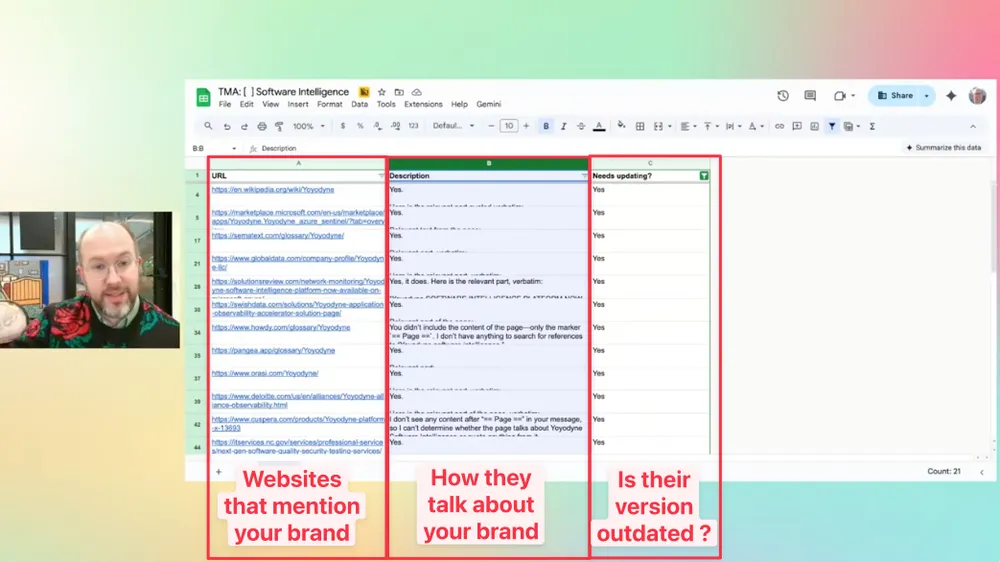
For example, let’s imagine a company called Yoyodyne. They recently changed the position for their Yoyo DB product. It switched from open source to enterprise. We prompt our workflow to ask particular questions of Claude, ChatGPT, Gemini: “What is the relationship between Yoyodyne and Yoyo DB?”

The whole research and analysis process takes about two minutes with AI. It outputs a simple document with three fields: URL, citation, analysis.

The first column showcases a URL. The second column provides the verbatim text from that URL. The third column tells you whether or not this messaging needs to be updated. (That yes/no analysis is run by an AI prompt we created in our workflow.)
The information you get from these external audits is illuminating. It can also be a bit frustrating to realize that you have no control over many of these websites. Taking down old blog posts or LinkedIn comments written by people you don’t know, for example, will require the kind of effort and luck that isn’t really scalable.
That energy is better spent on the stuff you do actually control. Which is why I recommend applying this audit workflow to your own website. The site may not be as tidy as you thought.
Audit the content on your own site with the same workflow
The workflows I showed you so far can be directed to audit any website. (When I’m asking it to audit “the internet” I’m really just running the audit without specifying a specific web domain.)
When you turn the workflows scope onto your own site, the same basic data scrape still applies. You can get even more granular on the analysis end, though. Beyond simply asking if a page needs to be updated, you can have the AI answer questions like…
- Does this blog post name the latest version of the product?
- Does it talk about use cases X, Y, and Z?
- Is the language aimed at C-suite (our new target audience) rather than engineers (our previous target audience)?
Outdated pages like that are the ones that ChatGPT and Gemini are citing when they give erroneous information about your product. They’re the root of your brand presence problem.
The number of outdated pages can be dispiriting
But remember: not every page flagged by the workflow is worth updating. If a page is old and it gets no traffic and it’s barely relevant, consider getting rid of it entirely.
If you find that there are a large number of pages worth updating then there are some automation options available. You can create integrations that automatically revise and re-publish in a CMS like Webflow or Wordpress. (This typically requires some bespoke work.)
Regardless, the first pages you update should be the pages that have the highest impact. You don’t need any fancy AI to find and fix those pages.
Manually audit the high-engagement pages on your site
The pages that perform best in search, and yield the most traffic, have outsized effects on how your brand is perceived by buyers, search engines, and LLMs.
Look at the pages that are performing best on your site. If any of them are blatant holdovers from your previous brand positioning, get rid of them. In the case of Common Room, a high-traffic page entitled “The basics of community marketing” needs to go. It’s only confusing people at this point.
I know it's really painful to remove pages that have strong metrics. Somebody worked hard on that content, which cost money, and those high-traffic metrics look great on a trend chart. But if the content can’t be reasonably revised to support your new brand narrative then it’s ultimately causing you harm.
To quote Michael Corleone in the Godfather: “Just when I thought I was out, they pull me back in.” You did all this work for a new product position but irrelevant, high-traffic pages will pull you back.

I use this app to audit my high-performing pages
This is where the ércule app actually really helps. (Yes, my team made it, but also: it’s great and it’s free and you can see for yourself.) You can click on the “Stars” tab to see all of your high-performing pages.
Scan the titles for a quick audit, make sure that nothing sticks out as blatantly tied to your outdated messaging. You can build custom libraries, too. Create a library for recently updated pages – or pages that all talk about a certain topic, like “AI pipegen”.
The èrcule app uses your Google Analytics data to build an index of your entire library.

Of course, you don’t absolutely need the app to do this. You could do something similar within your own CMS (though your CMS won't give you performance data). Build an index of your library and then you can easily go through and look for a specific topic.
The app just simplifies all of those processes for marketers who don’t want to get in the weeds with custom GA4 report engineering.
Search your entire content library by key phrase
I’ll search my own website’s library now for the phrase “Universal Analytics,” which was the branded name for Google analytics before GA4 arrived.

I’m seeing a bunch of universal analytics posts that we keep up here for illustrative reasons. But this post highlighted above is from three years ago. That might as well be a different epoch in the marketing world so I should probably get rid of that page.
The ércule app makes it easy to go through and find those things that you might need to take down altogether, especially if they're performing really well. There's lots of other cool stuff you can do with the ércule app, too, like keyword and topic research. Check it out for yourself and let me know what you think.